On React Reconciliation
A weird React behaviour I stumbled upon
Written by Mukesh Aryal
Written on 28th Nov, 2025

React is the most popular JavaScript frontend library that is powering small and big websites from Facebook
and GitHub to countless projects and web apps. I am also building a web app and I am using React for
the frontend.
While working on the app's optimization today, I noticed a weird performance bug. For some reason, when a
sibling component in my app was re-rendering, it was causing a re-render of another sibling component as
well. That just didn't make sense and I dug deeper and deeper, until I noticed something quite strange. I was
able to fix the problem and I am writing this blog post to share what I found.
The Problem
While running some tests to verify whether what I had found was genuine or not, I created a simple reproduction
of the behaviour. It is a simple React app created with Vite with the command npm create vite@latest and then React is chosen for the framework. Then, I removed the starter code and styles and had a project with
just 3 components: App, ComponentA and ComponentB.
The App component looks like this:
import ComponentB from './components/ComponentB';
function App() {
return(
</div>
}
export default App;
The ComponentA looks like this:
export default function ComponentA()
{
const [count, setCount] = useState(0);
return(
<h2>
<button onClick={() => { setCount(count => count + 1) }}>
Here is ComponentB:
{
return(
Now, I just use the Profiler from React Devtools and record a session. I just click the button
a bunch of times and see the Profiler data. Here is what I see:
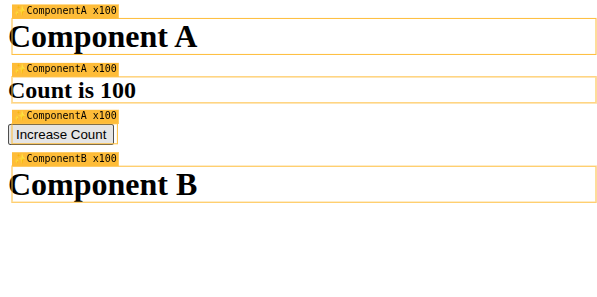
Here is what the Profiler has:
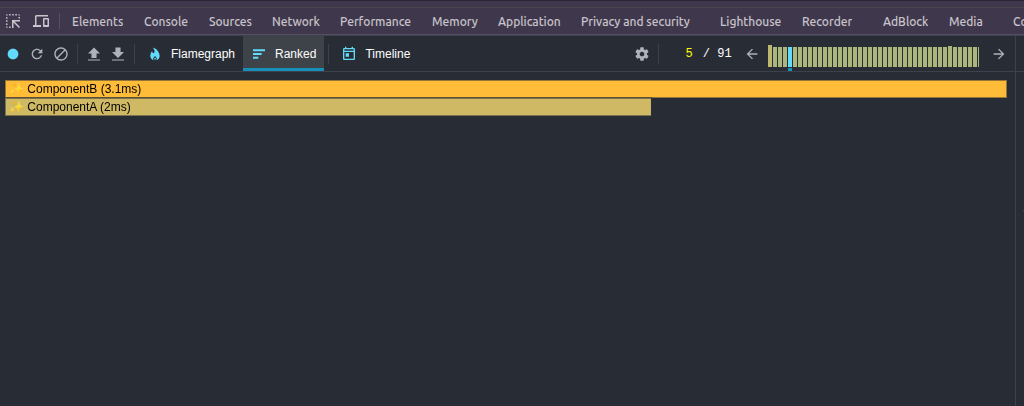
What? It took more time to "re-render" ComponentB than ComponentA itself? Hmm..
That doesn't make any sense.
For now, let's see why ComponentA had re-rendered:
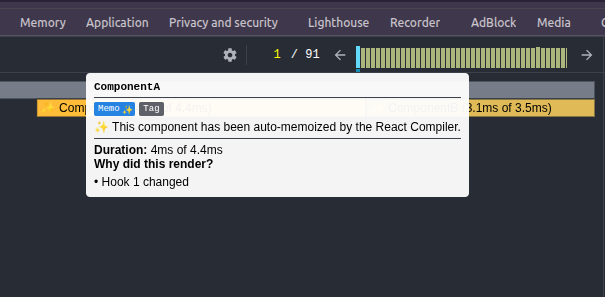
Well.... Because hook 1 changed! Makes sense! Fair enough.
But now is where things get interesting! Let's see why ComponentB had "re-rendered!":
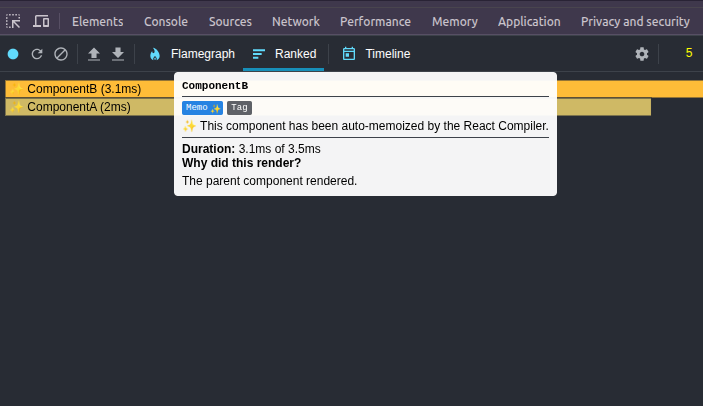
And by now you must be scratching your head. It says that ComponentB "re-rendered" because
its parent re-rendered! But the App component didn't re-render at all! And it gets even
crazier! Let's investigate the logs!

ComponentB just rendered the first time and never re-rendered at all! This is what we
also expect given they are the children of siblings, or cousins if you will! The function ComponentB didn't run again, and yet the Profiler says that the component "re-rendered".
So, why did the Profiler tell us that ComponentB "re-rendered" because its
parent "re-rendered"? That's what we want to find out!
Changing The Structure
Now, let's change the structure of the App component just slightly and see what happens.
import ComponentB from './components/ComponentB';
function App() {
return(
<div> </div>
</div>
}
export default App;
Let's again look at the re-renders:
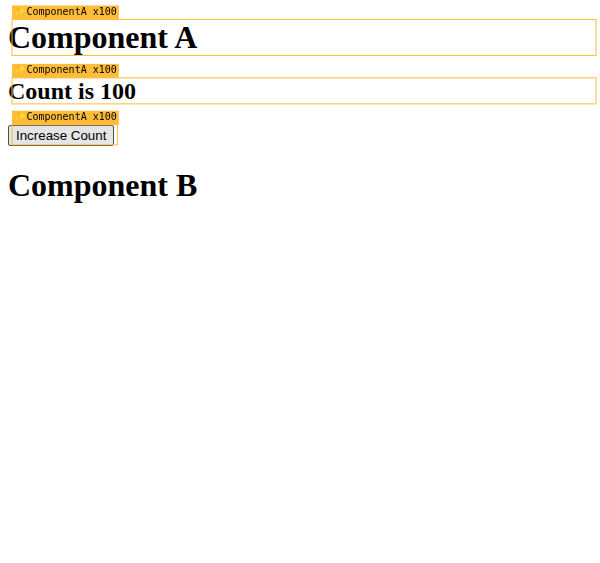
Now that makes sense and is what we actually expect!
Let's confirm the Profiler data as well:

Let's make sure everything is fine by verifying the console logs:

Yep! Again what we expect!
So, we now know how to "fix" the issue. As it turns out (from the observations we've done so far),
there is either an issue with how the reconciliation algorithm is implemented or the profiler is
showing some wrong data.
Implications
You might be thinking that the cousin situation is not that common and that it was not a big deal.
But, there will be soooo many cousins in compositions in apps. If this fails for compositions as well,
then it will be a BIG problem. Let's change the structure a bit more and see.
Let's define a Wrapper component that wraps the components.
{
And our new App component looks like this:
import ComponentA from './components/ComponentA';
import ComponentB from './components/ComponentB';
function App() {
</Wrapper>
export default App;
And how does the Profiler look like now? Good news! We don't see the issue! So, we can conclude that
the issue was only seen in the case of using a div inside the component.
Also, there won't be performance issues due to this in compositions throughout millions of React apps,
given that they aren't using divs for the composition and layout. It shouldn't too. That's great news.
Conclusion
So, we have seen that there is a little weird behaviour when we write our composition using divs.
But, when we use composition and then wrap the the individual components in divs
we see no problem whatsoever. For my app, I needed the parent component to define the layout inside which the
children component would be rendered and thus used the divs to enclose the children.
Due to my composition design and the weird React reconciliation behaviour, I saw that weird behaviour. I am also
opening an issue on the React GitHub to let more people know about this, and have a discussion with the
team on whether this is expected behaviour (which I doubt it is) or a bug. I will also post the update on this
post after I have the discussion.
Until next time! 👋